入门
管弦乐器使您能够全局监视性能并管理EdgeConnect(EC)设备,无论您是配置WAN优化网络(NX,VX或VRX设备)还是SD-WAN网络(EC或EC-V设备)。
在本页面:
Supported Browsers
Orchestrator and the Appliance Web user interfaces support the following browsers:
- Google Chrome (recommended)
- Microsoft Edge
- Mozilla Foxfire
- Opera
- 苹果浏览器
We recommend that you use the latest version available for your browser.
Guidelines for Creating Passwords
- Passwords should be a minimum of eight characters.
- There should be at least one lower case letter and one upper case letter.
- There should be at least one digit.
- 至少应该有一个特殊角色。
- 密码中的连续字母不应是字典单词。
Overview of SD-WAN Prerequisites
With Orchestrator, you create virtual network overlays to apply business intent to network segments. Provisioning a device is managed by applying profiles.
接口标签将每个接口与使用相关联。
- LAN标签是指交通类型,例如VoIP,,,,data, 或者replication。
- Wan标签是指服务或连接类型,例如Mpls,,,,互联网, 或者Verizon。
Deployment Profilesconfigure the interfaces and map the labels to them, to characterize the appliance.
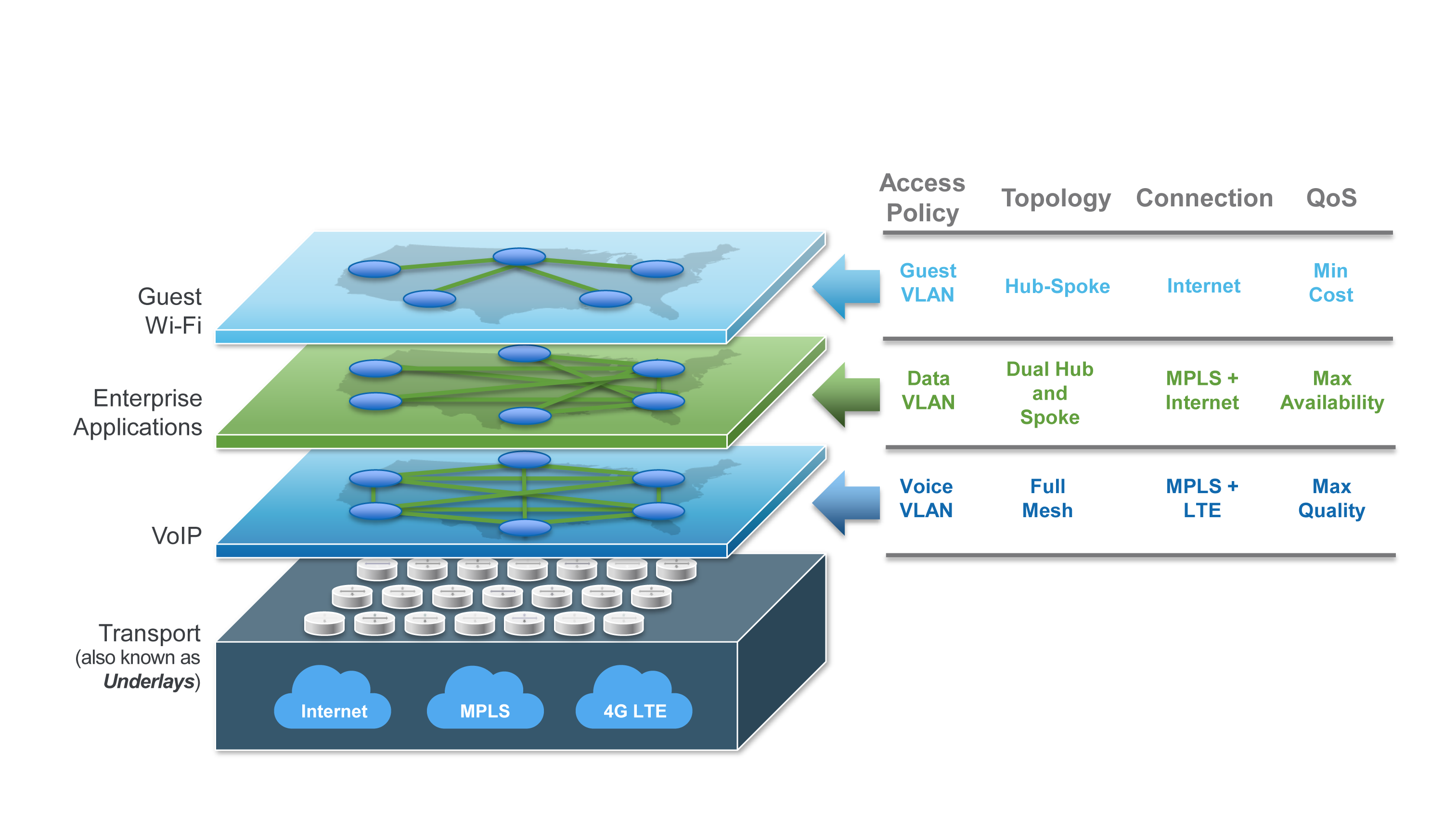
业务意图叠加使用部署配置文件中指定的标签来定义网站之间如何路由和优化流量。这些覆盖层可以指定首选路径,并可以基于application,,,,VLAN, 或者subnet,独立于底层的品牌和物理路由属性。
该图显示了基本的架构和功能Overlays。
在SD-WAN织物中包括一个新设备包括两个基本步骤:
- 注册和发现。After youAcceptthe discovered appliance, the配置Wizard打开。
- Provisioning.Because the wizard prompts you to select profiles, it is easier to create these ahead of time.
下图显示了安装和配置SD-WAN设备的过程。
