Getting Started
Orchestrator enables you to globally monitor performance and manage EdgeConnect (EC) appliances, whether you are configuring a WAN Optimization network (NX, VX, or VRX appliances) or an SD-WAN network (EC or EC-V appliances).
On this page:
Supported Browsers
Orchestrator and the Appliance Web user interfaces support the following browsers:
Google Chrome (recommended)
Microsoft Edge
Mozilla Foxfire
Opera
Safari
We recommend that you use the latest version available for your browser.
Guidelines for Creating Passwords
Passwords should be a minimum of eight characters.
There should be at least one lower case letter and one upper case letter.
There should be at least one digit.
There should be at least one special character.
Consecutive letters in the password should not be dictionary words.
Overview of SD-WAN Prerequisites
With Orchestrator, you create virtual network overlays to apply business intent to network segments. Provisioning a device is managed by applying profiles.
Interface Labels associate each interface with a use.
LANlabels refer to traffic type, such asVoIP,data, orreplication.
WANlabels refer to the service or connection type, such asMPLS,internet, orVerizon.
Deployment Profilesconfigure the interfaces and map the labels to them, to characterize the appliance.
Business Intent Overlaysuse the Labels specified in Deployment Profiles to define how traffic is routed and optimized between sites. These overlays can specify preferred paths and can link bonding policies based onapplication,VLAN, orsubnet, independent of the brand and physical routing attributes of the underlay.
This diagram shows the basic architecture and capabilities ofOverlays.
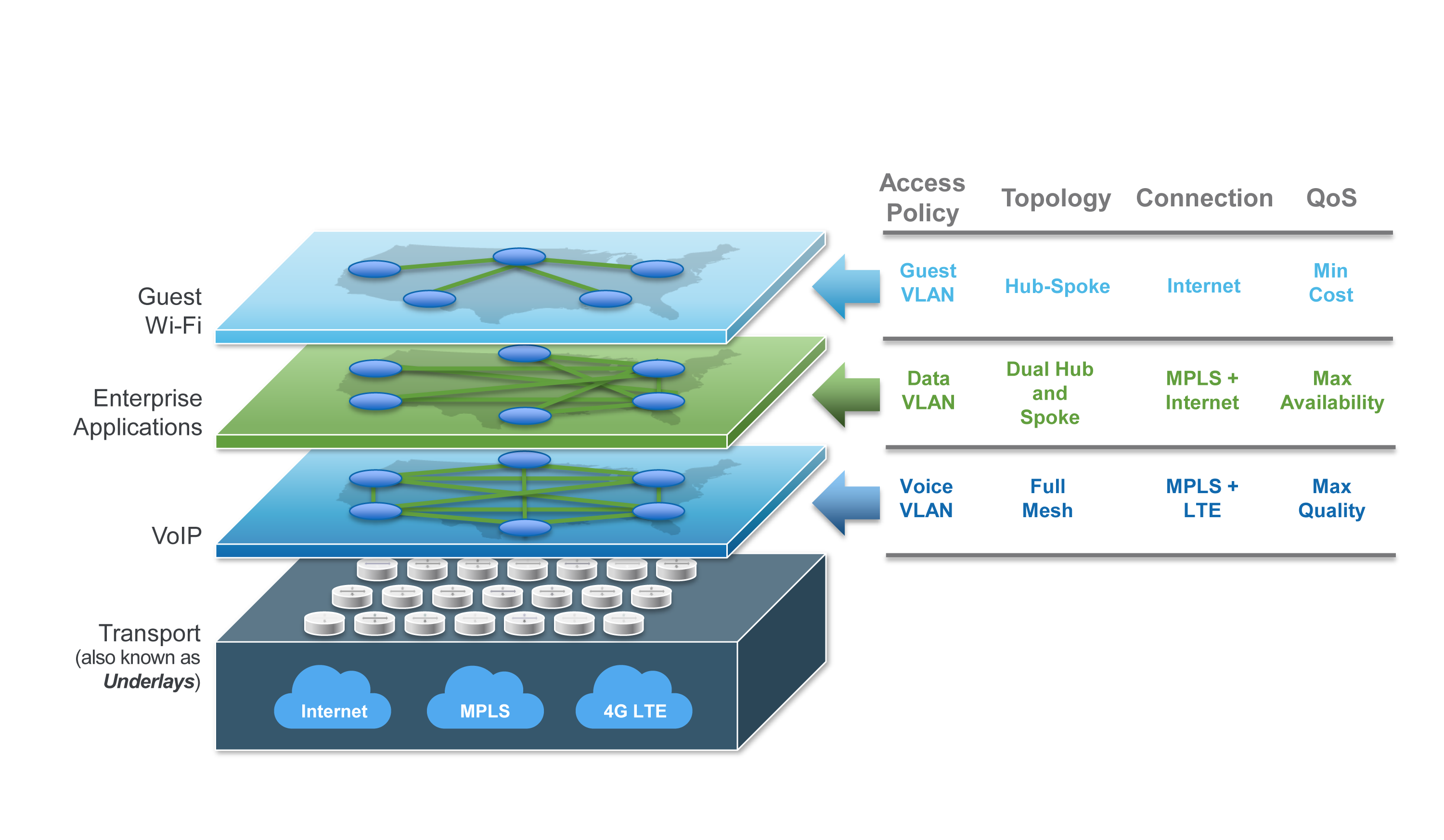
Including a new appliance into the SD-WAN fabric consists of two basic steps:
Registration and discovery.After youAcceptthe discovered appliance, theConfiguration Wizardopens.
Provisioning.Because the wizard prompts you to select profiles, it is easier to create these ahead of time.
The following figure shows the process of installing and provisioning an appliance for SD-WAN.
